Commands
Every fusionctl command with its usage line, what it prints and the options it takes. Usage lines are copied from fusionctl <command> --help.
Usage: fusionctl <command> [options] [--json]Every command accepts --json and --help. Output is a table or plain text on a terminal, and JSON when stdout is not a terminal (piped, redirected, called from an agent) or with --json.
| Exit code | Meaning |
|---|---|
0 | success |
1 | Fusion or the script failed; the script's traceback is on stderr, plus what --atomic rolled back. An error the add-in raises on purpose is one line, e.g. error: undo: only 3 timeline item(s) exist |
2 | bad arguments; the usage line is printed |
| Group | Commands |
|---|---|
| Session | ping, doctor, install, reload |
| Designs and scripts | new, exec, run, reset, undo, save |
| Reading the model | timeline, bodies, params, interference |
| Pictures and files | screenshot, export |
| API lookup | apidoc |
Session
ping
Usage: fusionctl pingFusion version, signed-in user, active document, units and model orientation (Y-up / Z-up). Also reports the version of the running add-in.
fusion       2705.1.30
document     Untitled
design       parametric
units        mm
orientation  Z-up
bridge       0.1.0
doctor
Usage: fusionctl doctorCheck the add-in install, the token and the live bridge, and say what to fix. Exits with 1 if any check fails. The transcript below was recorded with version 0.1.0; the current release is 0.2.0. The sign-in line is left out here.
ok    add-in installed        v0.1.0
ok    bridge reachable        Fusion 2705.1.30
ok    running add-in version  v0.1.0
ok    orientation             Z-up (affects which plane is the floor)
install
Usage: fusionctl install [--dir PATH]Copy the FusionBridge add-in into Fusion's AddIns folder (it starts with Fusion). The add-in is embedded in the CLI, so no checkout is needed. --dir installs into another folder (a FusionBridge folder is created inside it).
reload
Usage: fusionctl reloadReload bridge_ops.py inside Fusion after editing the add-in (no restart). Changes to FusionBridge.py itself need an add-in restart.
Designs and scripts
new
Usage: fusionctl newNew parametric design in millimetres; clears the persistent exec globals.
exec
Usage: fusionctl exec 'PYTHON' [--atomic]Run Python inside Fusion. Globals: app ui design root adsk mm P V VS. Set result = ... to return JSON. What the script prints comes first, then result. See Scripting in Fusion.
fusionctl exec 'result = design.userParameters.count'run
Usage: fusionctl run FILE.py [--atomic]Like exec, from a file. --atomic deletes the timeline items the script added if it fails. Tracebacks show the lines of your file.
reset
Usage: fusionctl resetForget the variables kept between exec/run calls. Variables a script defines stay available to the next exec or run until reset or new.
undo
Usage: fusionctl undo [N]Delete the last N timeline items (default 1) and list what was removed. Parameter edits are not undone.
It works on the timeline itself: Fusion's own Undo command does nothing for edits made through the API. It needs a parametric design with the timeline marker at the end, and refuses to remove more items than exist:
Removed Shank, Shank circle. 3 timeline item(s) left.error: undo: only 3 timeline item(s) existTo go back after params --set, set the old value again.
save
Usage: fusionctl save [--name NAME] [MESSAGE]Save the document (new documents need --name; they go to the active project). MESSAGE becomes the version description.
Reading the model
timeline
Usage: fusionctl timelineEvery timeline feature with its health and message. Health is one of ok, warning, error, suppressed, rolled back or unknown. Suppressed features are marked. Direct-modelling designs have no timeline.
#  feature       type            health       message
0  L profile     Sketch          ok
1  Bracket body  ExtrudeFeature  ok
2  Hole points   Sketch          ok
3  Base holes    HoleFeature     ok
4  Wall hole     HoleFeature     ok
5  Bend fillet   FilletFeature   ok
6  Bed chamfer   ChamferFeature  ok
bodies
Usage: fusionctl bodiesBodies in world coordinates: volume (mm³), bounding box (mm), face count. Bodies inside occurrences are listed with the occurrence path in where, at their real position. The JSON output also has the surface area, edge and shell counts and visibility.
body     where  solid  volume mm³  size mm       min mm       faces
Bracket  root   yes    6168.75     40 x 24 x 30  0 x -12 x 0     16
params
Usage: fusionctl params [--all] | params --set NAME=EXPR [NAME=EXPR ...]List user parameters (--all: model parameters too), or set/create them with --set. A name that does not exist is created as a user parameter in millimetres. The model regenerates after a change.
From version 0.2.0 the table's columns are name, expression, value and kind, where value is the formatted value (e.g. 8.00 mm), and the JSON has a display field with the same text. The table below was recorded with 0.1.0, which printed the unit instead:
name         expression  unit  kind
length       40 mm       mm    user
height       30 mm       mm    user
width        24 mm       mm    user
thick        4 mm        mm    user
hole_d       4.5 mm      mm    user
bend_r       3 mm        mm    user
bed_chamfer 0.6 mm mm userfusionctl params --set length=55mm hole_d=5.5mminterference
Usage: fusionctl interferencePairwise interference of all visible solid bodies. Zero overlap does not prove a fit: measure gaps too. Coincident faces do not count as interference.
No interference between 1 solid body.Pictures and files
screenshot
Usage: fusionctl screenshot OUT.png [--view iso|iso-bottom|front|back|top|bottom|left|right] [--size 1280x960]Save the viewport as PNG, optionally from a named view (fits the model first). Without --view the current camera is kept and the model is fitted.
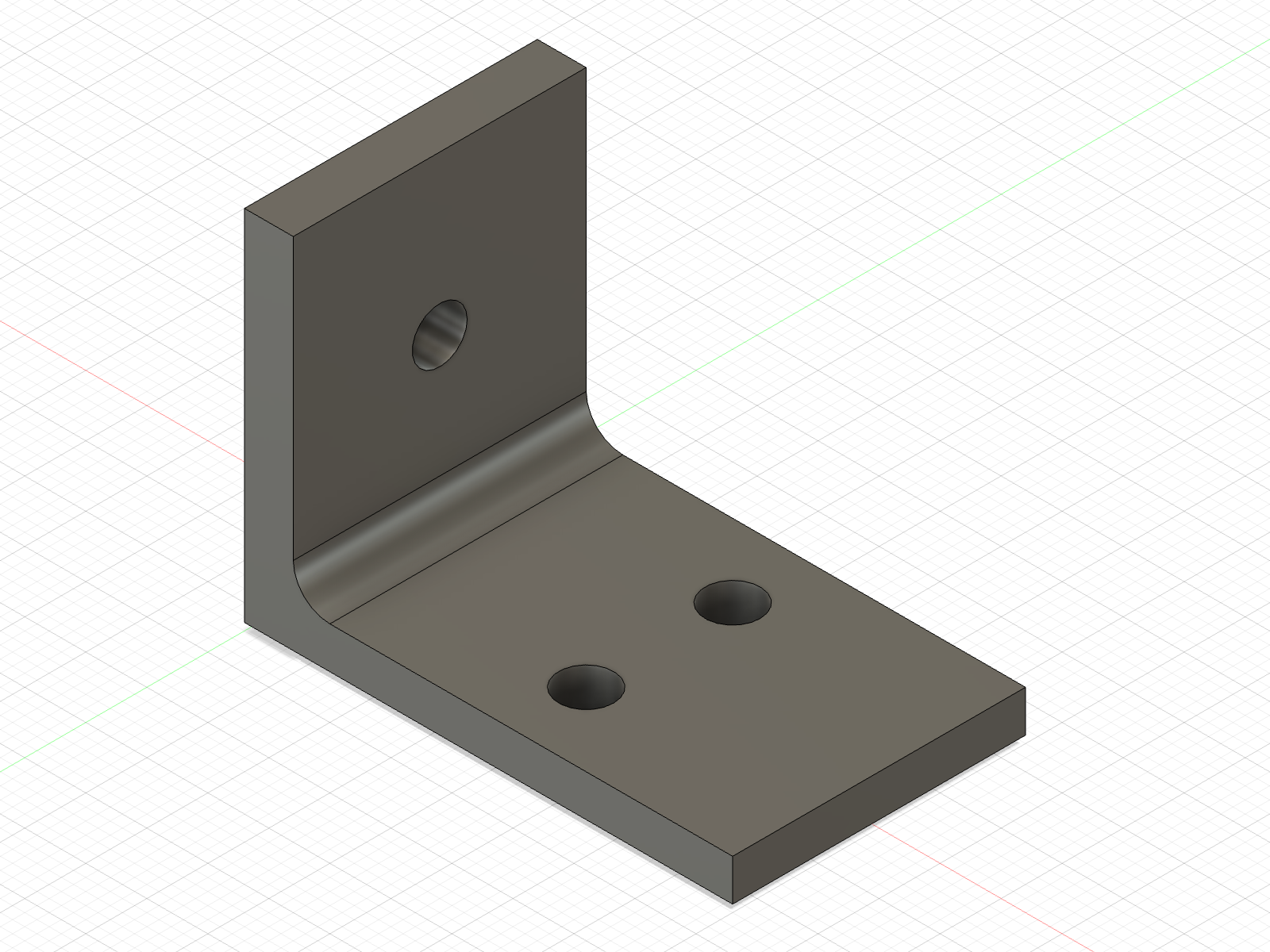
--view iso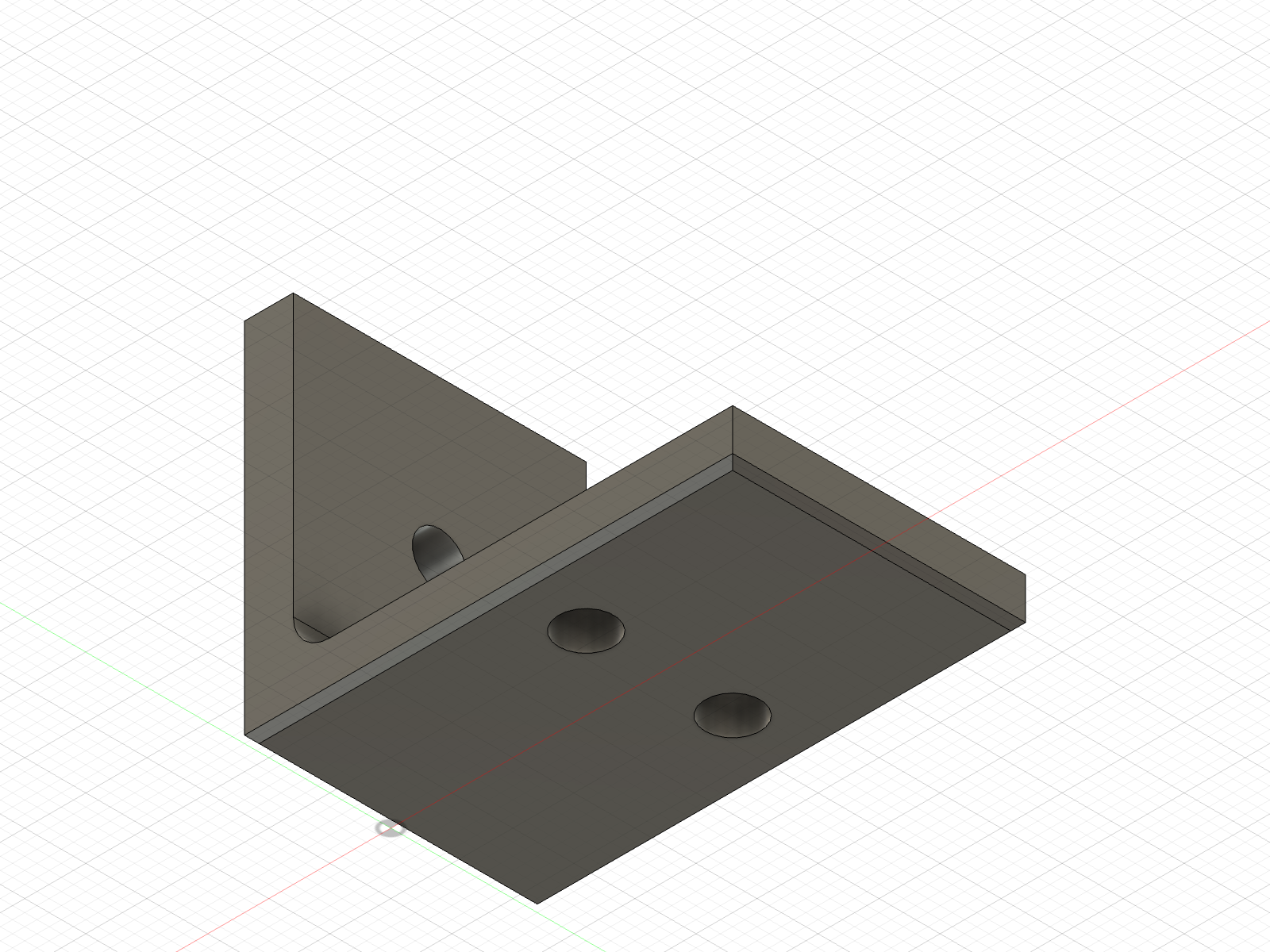
--view iso-bottomexport
Usage: fusionctl export OUT.step|.stl|.3mf|.f3dExport the whole design; the format follows the extension. .stp also works for STEP. STL is written with high mesh refinement. Prints the path and the size; an empty file counts as a failure.
API lookup
apidoc
Usage: fusionctl apidoc TERM [--kind class|member|text|all] [--limit N]Search the live adsk API of this Fusion build, e.g. ExtrudeFeatures.addSimple. Narrow a search with Class.member or fusion.Class; --kind text searches the docstrings. The search is adapted from Autodesk's FusionMCPSample (MIT).
adsk.fusion.ExtrudeFeatures.addSimple(profile: Base, distance: ValueInput, operation: FeatureOperations) -> adsk.fusion.ExtrudeFeature
  Creates a basic extrusion that goes from the profile plane the specified distance.
  profile : The profile argument can be a single Profile, a single planar face, a single SketchText object,
  or an ObjectCollection consisting of multiple profiles, planar faces, and sketch texts.
  When an ObjectCollection is used all of the profiles, faces, and sketch texts must be co-planar.
  This method can only be used to create solid extrusions. To create a surface extrusion you need
  to use the add method.
  distance : ValueInput object that defines the extrude distance. A positive value extrudes in the positive direction
  of the sketch plane and negative value is in the opposite direction.
  operation : The feature operation to perform.
  Returns the newly created ExtrudeFeature or null if the creation failed.
Made by Lucas Piera. MIT licence. fusionctl is not affiliated with or endorsed by Autodesk; Autodesk and Fusion are trademarks of Autodesk, Inc.
For agents
How a coding agent (Claude Code, Codex, OpenCode) should use fusionctl, the rules in AGENTS.md, and the plain-text versions of these docs.
Scripting in Fusion
The globals a fusionctl script gets, the API's centimetres, which way each sketch plane points, user parameters, and recipes taken from examples/bracket.py.