Assemblies and joints
Components, rigid and revolute joints, driving a joint, and interference and clearance checks, with the code of the recorded wristwatch in examples/watch.
fusionctl has no assembly commands of its own. fusionctl run gives a script the whole Fusion API, so components and joints are made in Python, and bodies, timeline and interference read the assembly back. Everything on this page comes from one session, recorded on 18 October 2026 on Fusion 2705.1.30 (macOS): a coding agent built an analog wristwatch in 15 scripts, examples/watch. The home page replays it.
| What | In the watch |
|---|---|
| Components | 11, one per part, with 14 solid bodies |
| Joints | 8 rigid (Caseback, Crown, Dial, Arbor, Glass, Bezel, Straps, Spring bars), 3 revolute (Hour, Minute and Second pivot) |
| Size | 43.6 x 78.4 x 12.7 mm |
| Timeline | every item ok |
fusionctl interference | no interference between the 14 bodies |
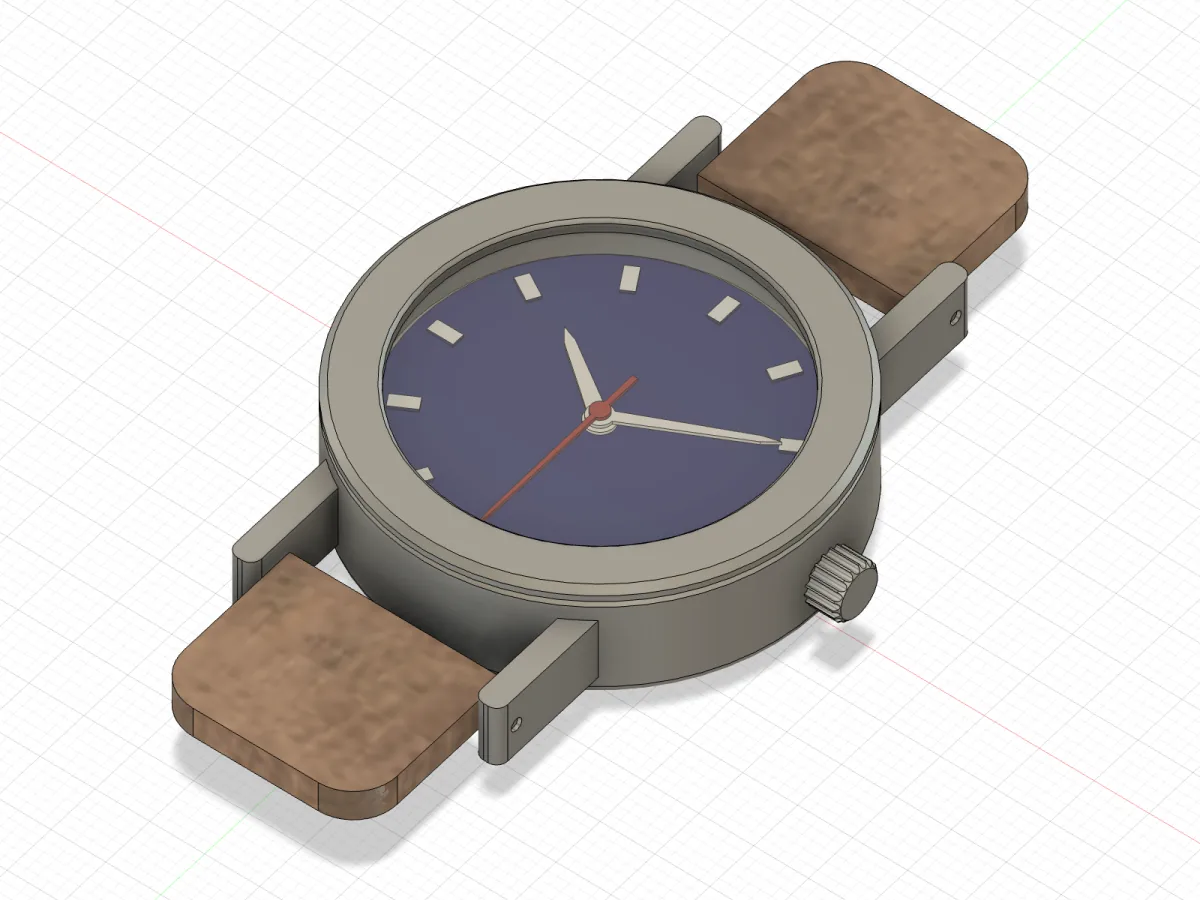
14-time.py: the hands at 10:10:30, driven through their revolute joints.Components
Give every part its own component. A body in the root is fine for a single part; joints connect occurrences of components, and bodies then lists each part under its own occurrence. The case is the first one:
occ = root.occurrences.addNewComponent(adsk.core.Matrix3D.create())
case = occ.component
case.name = "Case"
Everything after that is built inside case: its sketches on case.xYConstructionPlane, its features from case.features. Later scripts find the component again by name with design.allComponents.itemByName("Case").
Each part was built in place, at its final position, with its component origin at the dial centre. That keeps the joints simple: every joint connects two component origins.
body         where          solid  volume mm³  size mm            min mm             faces
Case         Case:1         yes    9461.05     40 x 54 x 10       -20 x -27 x 0         41
Crown        Crown:1        yes    53.53       4.6 x 5 x 4.95     19 x -2.5 x 2.52      41
Caseback     Caseback:1     yes    1512.81     36 x 36 x 1.5      -18 x -18 x -1.5       4
Dial         Dial:1         yes    438.02      33 x 33 x 0.8      -16.5 x -16.5 x 6     63
Arbor        Arbor:1        yes    0.7         0.8 x 0.8 x 1.4    -0.4 x -0.4 x 6.5      3
Hour hand    Hour hand:1    yes    3.7         2.6 x 10.54 x 0.3  -1.3 x -1.3 x 7        8
Minute hand  Minute hand:1  yes    3.58        2.2 x 14.3 x 0.3   -1.1 x -1.1 x 7.5      8
Second hand  Second hand:1  yes    2.46        1.6 x 18.19 x 0.3  -0.8 x -4 x 8         11
where is the occurrence path. The sizes and positions are in world millimetres, so a part inside a component is checked where it really is.
Rigid and revolute joints
13-joints.py grounds the case, fixes eight parts to it with rigid joints and puts the three hands on revolute joints about Z:
J = adsk.fusion.JointGeometry
occ = {o.component.name: o for o in root.occurrences}

def origin(name):
    o = occ[name]
    return J.createByPoint(o.component.originConstructionPoint.createForAssemblyContext(o))

occ["Case"].isGrounded = True
joints = {}
for part in ("Caseback", "Crown", "Dial", "Arbor", "Glass", "Bezel", "Straps", "Spring bars"):
    ji = root.joints.createInput(origin(part), origin("Case"))
    ji.setAsRigidJointMotion()
    j = root.joints.add(ji)
    j.name = part + " fixed"
for hand in ("Hour hand", "Minute hand", "Second hand"):
    ji = root.joints.createInput(origin(hand), origin("Dial"))
    ji.setAsRevoluteJointMotion(adsk.fusion.JointDirections.ZAxisJointDirection)
    j = root.joints.add(ji)
    j.name = hand.split()[0] + " pivot"
result = {j.name: j.jointMotion.objectType.split("::")[-1] for j in root.joints}JointGeometry.createByPointonoriginConstructionPoint.createForAssemblyContext(occurrence): the component origin, seen from the root, where joints live.root.joints.createInput(moving, fixed): the first geometry moves to the second.setAsRigidJointMotion()locks a part;setAsRevoluteJointMotion(ZAxisJointDirection)leaves one rotation about Z.
{
  "Caseback fixed": "RigidJointMotion",
  "Crown fixed": "RigidJointMotion",
  "Dial fixed": "RigidJointMotion",
  "Arbor fixed": "RigidJointMotion",
  "Glass fixed": "RigidJointMotion",
  "Bezel fixed": "RigidJointMotion",
  "Straps fixed": "RigidJointMotion",
  "Spring bars fixed": "RigidJointMotion",
  "Hour pivot": "RevoluteJointMotion",
  "Minute pivot": "RevoluteJointMotion",
  "Second pivot": "RevoluteJointMotion"
}
The joints are timeline items like any feature, and grounding the case adds a Pin1 item. The end of the timeline after this step (12 of its 102 rows):
  #  feature                    type                    health       message
 90  Pin1                       Occurrence              ok
 91  Caseback fixed             Joint                   ok
 92  Crown fixed                Joint                   ok
 93  Dial fixed                 Joint                   ok
 94  Arbor fixed                Joint                   ok
 95  Glass fixed                Joint                   ok
 96  Bezel fixed                Joint                   ok
 97  Straps fixed               Joint                   ok
 98  Spring bars fixed          Joint                   ok
 99  Hour pivot                 Joint                   ok
100  Minute pivot               Joint                   ok
101  Second pivot               Joint                   ok
Driving a joint
A revolute joint turns its part through jointMotion.rotationValue, in radians. 14-time.py sets 10:10:30 and reads each hand tip back in world space:
import math
H, M, S = 10, 10, 30
angles = {  # clockwise degrees from 12 o'clock
    "Hour": (H % 12 + M / 60 + S / 3600) * 30,
    "Minute": (M + S / 60) * 6,
    "Second": S * 6,
}
occ = {o.component.name: o for o in root.occurrences}
length = {"Hour": "hour_l", "Minute": "min_l", "Second": "sec_l"}
out = {}
for hand, deg in angles.items():
    j = root.joints.itemByName(hand + " pivot")
    j.jointMotion.rotationValue = -math.radians(deg)
    adsk.doEvents()
    o = occ[hand + " hand"]
    tip = adsk.core.Point3D.create(0, design.userParameters.itemByName(length[hand]).value, 0)
    tip.transformBy(o.transform2)
    out[hand] = {"set_deg": round(deg, 2),
                 "joint_deg": round(-math.degrees(j.jointMotion.rotationValue), 2),
                 "tip_clock_deg": round(math.degrees(math.atan2(tip.x, tip.y)) % 360, 2),
                 "tip_xy_mm": [round(tip.x * 10, 2), round(tip.y * 10, 2)]}
Clockwise seen from above (+Z) is a negative rotation about Z, hence -math.radians(deg). o.transform2 is where the joint moved the occurrence, so the tip read through it shows whether the hand points where the clock says:
{
  "Hour": {
    "set_deg": 305.25,
    "joint_deg": 305.3,
    "tip_clock_deg": 305.3,
    "tip_xy_mm": [
      -7.54,
      5.34
    ]
  },
  "Minute": {
    "set_deg": 63,
    "joint_deg": 63,
    "tip_clock_deg": 63,
    "tip_xy_mm": [
      11.76,
      5.99
    ]
  },
  "Second": {
    "set_deg": 180,
    "joint_deg": 180,
    "tip_clock_deg": 180,
    "tip_xy_mm": [
      0,
      -14.19
    ]
  },
  "clearance_mm": {
    "Dial / Hour hand": 0.5,
    "Hour hand / Minute hand": 0.2,
    "Minute hand / Second hand": 0.2,
    "Second hand / Glass": 0.9,
    "Arbor / Hour hand": 0.1,
    "Arbor / Minute hand": 0.1,
    "Arbor / Second hand": 0.1
  }
}
joint_deg and tip_clock_deg agree: hour 305.3°, minute 63°, second 180°. The hour hand was set to 305.25° and reads back 305.3°, see the first pitfall below.
15-turn.py then turns the hands through one hour in 24 steps, saving a frame from two fixed cameras at each step. Before it captures anything it hides the joint glyphs and construction geometry:
root.isJointsFolderLightBulbOn = False            # hide joint glyphs and construction axes/planes
for comp in design.allComponents:
    comp.isConstructionFolderLightBulbOn = False
app.userInterface.activeSelections.clear()
vp = app.activeViewport
joints = {h: root.joints.itemByName(h + " pivot") for h in ("Hour", "Minute", "Second")}
start = {"Hour": (10 + 10.5 / 60) * 30, "Minute": 10.5 * 6, "Second": 180.0}
step = {"Hour": 15 / 12, "Minute": 15.0, "Second": 60.0}
log = []
for i in range(FRAMES + 1):
    clock = {h: (start[h] + i * step[h]) % 360 for h in joints}
    for h, j in joints.items():
        j.jointMotion.rotationValue = -math.radians(clock[h])
    adsk.doEvents()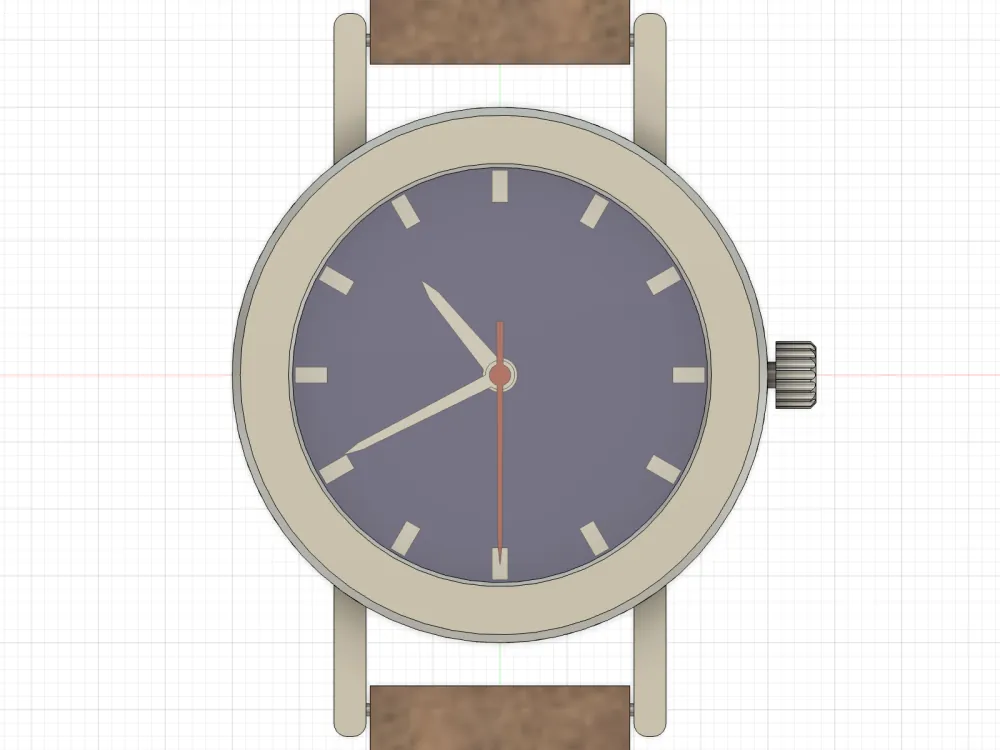
15-turn.py, top view: 10:40:30.Interference and clearance
fusionctl interference checks every pair of visible solid bodies:
No interference between 14 solid bodies.No overlap does not prove the parts fit, so 14-time.py also measures the air between them at this pose with measureMinimumDistance:
# clearances at this pose, measured on the assembly-context bodies (mm)
def body(comp):
    return occ[comp].bRepBodies.item(0)
gaps = {}
for a, b in (("Dial", "Hour hand"), ("Hour hand", "Minute hand"), ("Minute hand", "Second hand"),
             ("Second hand", "Glass"), ("Arbor", "Hour hand"), ("Arbor", "Minute hand"), ("Arbor", "Second hand")):
    gaps[f"{a} / {b}"] = round(app.measureManager.measureMinimumDistance(body(a), body(b)).value * 10, 3)
out["clearance_mm"] = gaps
At 10:10:30: dial to hour hand 0.5 mm, hour to minute hand 0.2 mm, minute to second hand 0.2 mm, second hand to glass 0.9 mm, arbor to each hub 0.1 mm. 09-hands.py places the hand layers with the user parameters hand_t and hand_gap.
Parameters through the assembly
The sizes are 22 user parameters, created by 01-params.py. One change regenerates every component:
case_d 36 mmbody where solid volume mm³ size mm min mm faces
Case Case:1 yes 7910.61 36 x 50 x 10 -18 x -25 x 0 41
Crown Crown:1 yes 53.53 4.6 x 5 x 4.95 17 x -2.5 x 2.52 41
Caseback Caseback:1 yes 1193.94 32 x 32 x 1.5 -16 x -16 x -1.5 4
Dial Dial:1 yes 340.63 29 x 29 x 0.8 -14.5 x -14.5 x 6 63
Arbor Arbor:1 yes 0.7 0.8 x 0.8 x 1.4 -0.4 x -0.4 x 6.5 3
Hour hand Hour hand:1 yes 3.32 2.6 x 9.42 x 0.3 -1.3 x -1.3 x 7 8
Minute hand Minute hand:1 yes 3.19 2.2 x 12.7 x 0.3 -1.1 x -1.1 x 7.5 8
Second hand Second hand:1 yes 2.26 1.6 x 16.47 x 0.3 -0.8 x -4 x 8 11
Glass Glass:1 yes 557.97 29.8 x 29.8 x 0.8 -14.9 x -14.9 x 9.2 3
Bezel Bezel:1 yes 510.41 36 x 36 x 1.2 -18 x -18 x 10 6
Strap 12 Straps:1 yes 888.66 19.4 x 16 x 3 -9.7 x 21.2 x 3.5 9
Strap 6 Straps:1 yes 888.66 19.4 x 16 x 3 -9.7 x -37.2 x 3.5 9
Spring bar 12 Spring bars:1 yes 19.01 24.2 x 1 x 1 -12.1 x 22.5 x 4.5 3
Spring bar 6 Spring bars:1 yes 19.01 24.2 x 1 x 1 -12.1 x -23.5 x 4.5 3No interference between 14 solid bodies.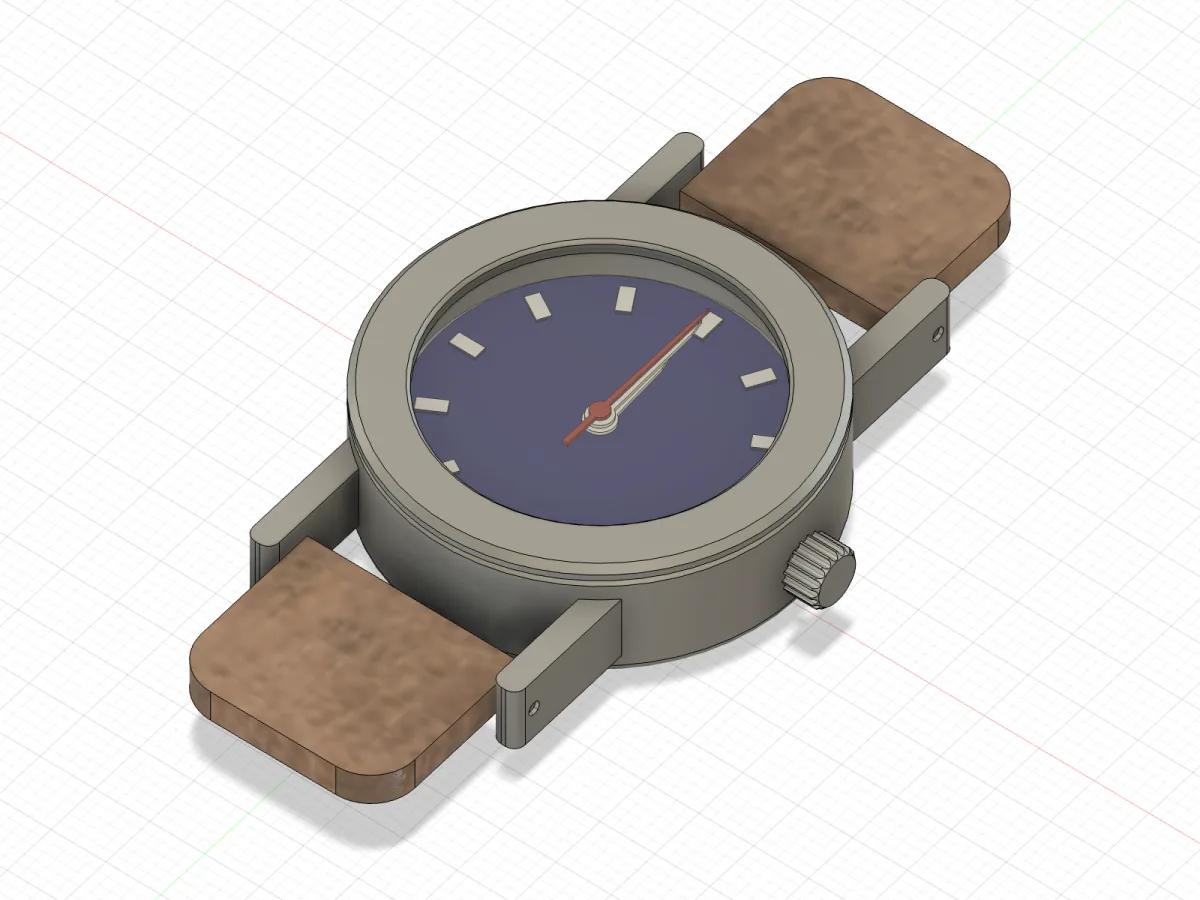
params --set case_d=36mm: everything followed, and the hands went back to 12.The recompute put the driven joints back to 0°, which is why the hands point at 12. After params --set case_d=40mm the session ran 14-time.py again to set 10:10:30.
Pitfalls
Each of these was met while building the watch on Fusion 2705.1.30.
-
rotationValuesnaps to the angular display precision. 12.34° reads back as 12.3°, and 305.25° as 305.3°. Compare read-back angles with that tolerance. -
Any recompute resets driven joints to 0°.
params --setis a recompute, so set the pose again after a parameter edit (re-run the script that drives the joints). -
Clockwise seen from +Z is a negative
rotationValue. A clock face looked at from above needs-math.radians(deg). -
Joint and axis glyphs show up in screenshots.
root.isJointsFolderLightBulbOn = Falsehides the joints, andcomp.isConstructionFolderLightBulbOn = Falsefor each component hides construction axes and planes. -
A sketch and a feature with the same name make Fusion rename the feature, to "Lug (1)". Give sketches their own names ("Lug outline") and keep references to the feature objects instead of looking them up by name, as
03-lugs.pydoes for its mirror:examples/watch/03-lugs.py feats = adsk.core.ObjectCollection.create() feats.add(lug); feats.add(lug_fillet) m = case.features.mirrorFeatures mirror9 = m.add(m.createInput(feats, case.yZConstructionPlane)) mirror9.name = "Lug mirror 9" feats.add(mirror9) m.add(m.createInput(feats, case.xZConstructionPlane)).name = "Lug mirror 6" -
Fully constrain every sketch a parameter drives. The first hand outline had only its tip dimensioned; at
case_d=36mmthe solver dragged the free corners and the hour hub slid into the arbor.09-hands.pynow fixes the base corners, dimensions the tip and the shoulders, and checks it:assert bs.isFullyConstrained, name.
Files
- The scripts:
examples/watch, with a README listing the commands in order. - The exports from the session: watch.step and watch.3mf.
- Verifying a part has the checks for single parts; Scripting in Fusion has the units and sketch-plane rules the scripts rely on.
Made by Lucas Piera. MIT licence. fusionctl is not affiliated with or endorsed by Autodesk; Autodesk and Fusion are trademarks of Autodesk, Inc.
Verifying a part
A script that ran without an exception is not proof that the geometry is right. Check the timeline, the bodies, interference and screenshots after every step, and print a test piece.
How it works & security
The CLI sends one HTTP request per command to the FusionBridge add-in on 127.0.0.1, with a token. The add-in runs it on Fusion's main thread. exec runs arbitrary Python as your user.