For agents
How a coding agent (Claude Code, Codex, OpenCode) should use fusionctl, the rules in AGENTS.md, and the plain-text versions of these docs.
fusionctl was written for coding agents as much as for people. The commands print JSON when they are not on a terminal, and every check returns numbers an agent can compare against a spec.
It needs an agent that can run shell commands. For a chat app without a terminal, Autodesk's own Fusion MCP Server is the better fit; fusionctl and MCP compares the two.
For humans
Read Installation and the Quickstart first. Scripting in Fusion and Verifying a part are the two pages an agent's rules are built from. Every page has Copy Markdown and Open buttons at the top if you want to paste it into a chat.
For agents
The same docs as plain text, built with the site:
| URL | What |
|---|---|
/llms.txt | index of every page with a one-line summary |
/llms-full.txt | all pages in one file |
/llms.mdx/docs/<page>/content.md | one page as Markdown, e.g. /llms.mdx/docs/scripting/content.md |
AGENTS.md | the rules below, in the repository (raw) |
Put a line like this in your project's CLAUDE.md or AGENTS.md:
Before driving Fusion with fusionctl, read https://github.com/pieralukasz/fusionctl/blob/main/AGENTS.md
and https://fusionctl.lucaspiera.com/llms-full.txt
A recorded session
The replay on the home page is a real session, recorded on 18 October 2026 on Fusion 2705.1.30 (macOS). Claude, working in a terminal, was given one request, "M8 x 20 hex bolt, modelled thread, ready to print.", and ran these commands. All of them exited 0.
fusionctl ping
fusionctl new
fusionctl run examples/bolt/01-params.py --atomic   # d, length, head_af, head_h, tip
fusionctl run examples/bolt/02-head.py --atomic     # hex head
fusionctl bodies
fusionctl run examples/bolt/03-shank.py --atomic    # shank
fusionctl bodies
fusionctl run examples/bolt/04-tip.py --atomic      # tip chamfer
fusionctl run examples/bolt/05-thread.py --atomic   # modelled thread
fusionctl timeline
fusionctl bodies
fusionctl screenshot bolt-iso.png --view iso
fusionctl export bolt.3mf
fusionctl export bolt.step
What it read back along the way:
| After | bodies said | Checked by hand |
|---|---|---|
| head | 804.97 mm³, 13 x 15.01 x 5.5 mm | (√3/2) · 13² · 5.5 = 804.97 |
| shank | 1810.28 mm³, 13 x 15.01 x 25.5 mm | + π · 4² · 20 = 1005.31 |
| tip chamfer and thread | 1605.1 mm³, 13 x 15.01 x 25.5 mm, 15 faces | less than before: the chamfer and the thread groove remove material |
05-thread.py let Fusion pick the thread with recommendThreadData: M8x1.25, class 6g. The timeline ended with seven items, all ok. Afterwards fusionctl params --set length=30mm head_af=10mm regenerated the bolt, thread included, with every item still ok (not captured on the home page).
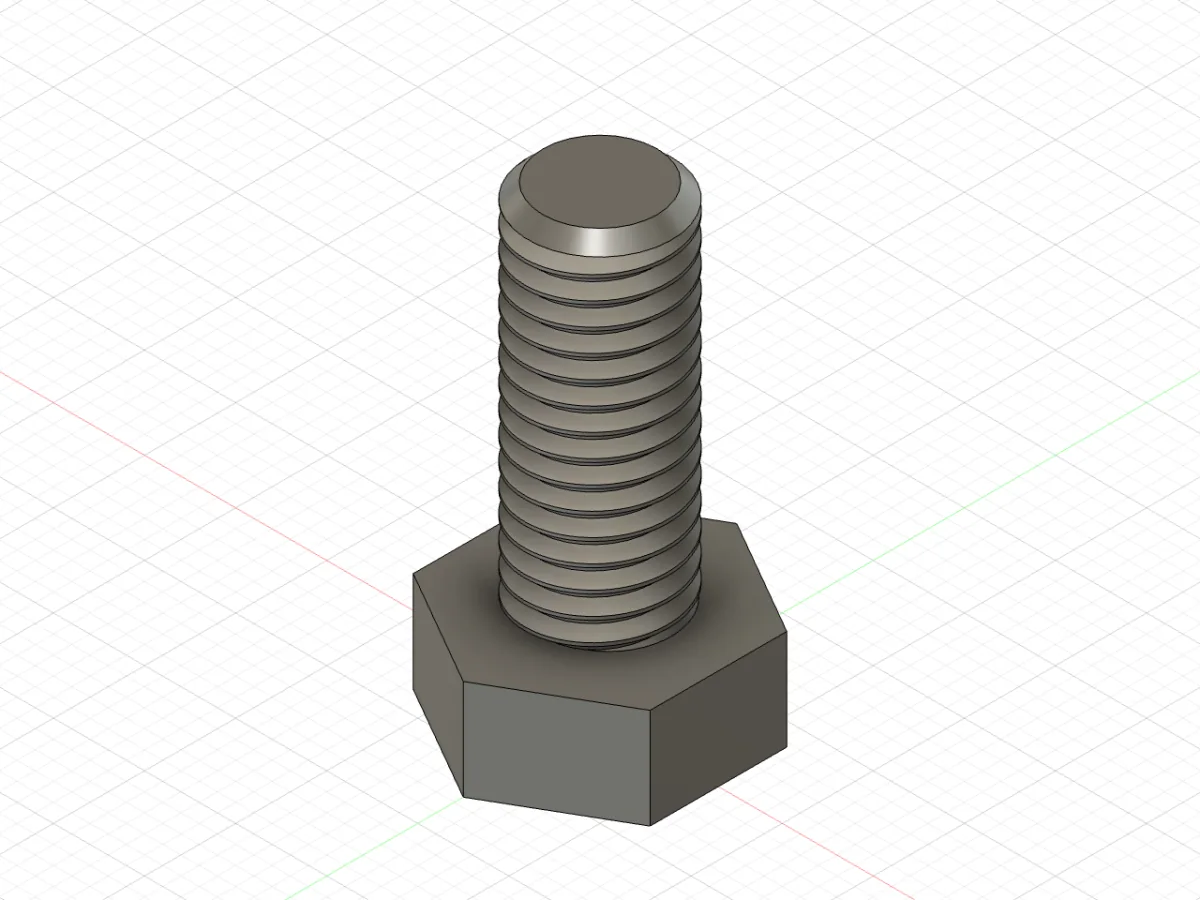
fusionctl screenshot bolt-iso.png --view iso.The scripts are in examples/bolt. The exports: bolt.step and bolt.3mf.
A second session: a wristwatch
The home page also replays a larger session from the same day: an agent built an analog wristwatch with 32 commands, all exiting 0, and 15 scripts in examples/watch. It has 11 components and 14 bodies, 8 rigid joints and 3 revolute joints for the hands, set to 10:10:30. After each step it read bodies and timeline; at the end fusionctl interference found no interference between the 14 bodies, also after params --set case_d=36mm regenerated the whole watch. Then it turned the hands through one hour on their joints. Assemblies and joints walks through the code. The exports: watch.step and watch.3mf.
The rules in AGENTS.md
A summary. The file itself is the reference; every rule in it was checked on a live Fusion (build 2705.1.30, macOS, October 2026).
Start of a session
fusionctl doctor; fix any failing check before modelling.fusionctl pingand readorientation: Z-up means the bed is XY, Y-up means the floor is XZ. Do not assume either.fusionctl newfor a fresh parametric design in millimetres.
Units and parameters
- The API works in centimetres and radians.
mm(5)returns0.5. Millimetre numbers inPoint3Dmake the part ten times too large without an error. - Use
VS("12 mm")orVS("width / 2")for feature sizes, and create user parameters first sofusionctl params --setregenerates the model.
Sketch planes
| Plane | sketch +X | sketch +Y | extrude (+) |
|---|---|---|---|
xYConstructionPlane | world +X | world +Y | +Z |
xZConstructionPlane | world +X | world −Z | +Y |
yZConstructionPlane | world −Z | world +Y | +X |
Pitfalls
- Two sketch points with the same X cannot both get a horizontal dimension from the origin (
VCS_SKETCH_OVER_CONSTRAINTS). Dimension one fully, the other only in Y, thenaddVerticalPoints. - Holes drill against the sketch normal; from the XY plane at the bed use
NegativeExtentDirectionto drill up. - A bare sketch point does not follow parameter changes; dimension it to the origin with an expression.
- New occurrences are grounded to their parent; set
isGroundToParent = Falsebeforetransform2, then take a snapshot if one is pending. - The 3MF export method is
createC3MFExportOptions. - Never open dialogs from a script: a modal dialog blocks the bridge.
- Check class and method names with
fusionctl apidocinstead of guessing from older samples.
Work in small, checked steps
- One feature or a few per
run, with--atomic. - After each step:
timeline(allok) andbodies(count, volume, bounding box change as expected). - No exception is not proof. Measure, run
interferencefor assemblies, and look atscreenshot --view iso,frontandtopbefore saying it is done. - Fix a failing native feature instead of replacing it with manual cuts.
- Export STEP as the source of truth, 3MF or STL for the slicer, and print a test piece of any critical fit.
Output and exit codes
JSON when stdout is not a terminal or with --json. 0 success, 1 Fusion or the script failed (traceback on stderr, plus what --atomic rolled back), 2 bad arguments.
Made by Lucas Piera. MIT licence. fusionctl is not affiliated with or endorsed by Autodesk; Autodesk and Fusion are trademarks of Autodesk, Inc.
Quickstart
Build the example L-bracket in a running Fusion, read it back as numbers, change one parameter and export it. Every output on this page is a real transcript.
Commands
Every fusionctl command with its usage line, what it prints and the options it takes. Usage lines are copied from fusionctl <command> --help.